
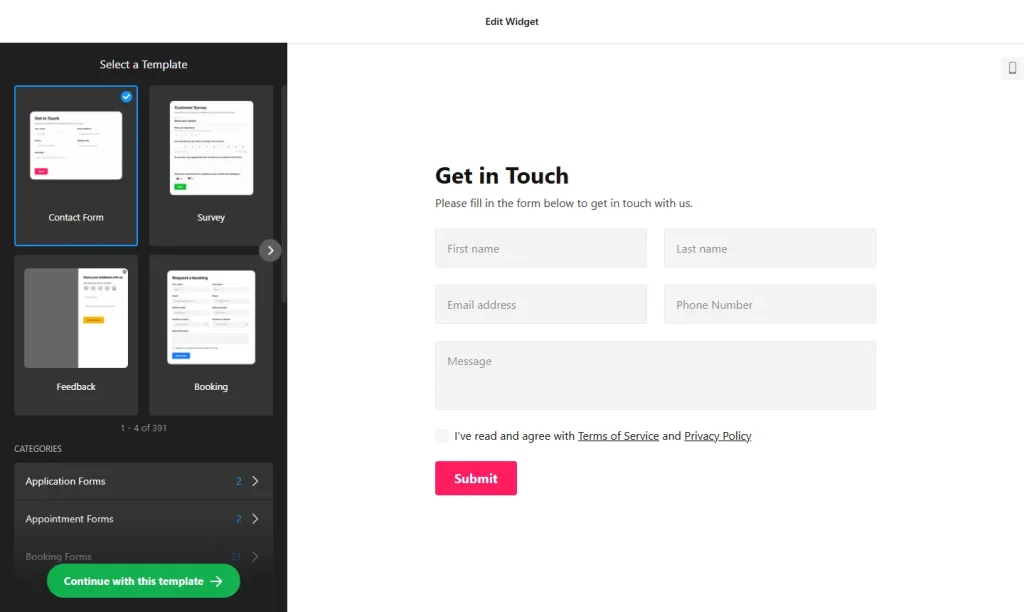
Use the online form builder below to create a free form for your WordPress website. Choose a template and click “Continue with this template” to customize it.
A WordPress site can need several forms at once: a reader survey on the blog, a registration form for a webinar, a quote request on a service page, a wholesale application for a WooCommerce shop. Building them here keeps them out of your plugin list. Pick a template or describe the form to the AI tool, adjust the fields, then paste the code into a Custom HTML block.
How to add a Form Builder widget to WordPress
1. Create your widget
- Choose a template from categories like Registration forms, Event registration forms, Newsletter forms and Order forms, or start from Blank.
- Or let AI draft it: describe the form you need, such as “guest post submission with title, summary and file upload”, and the AI form generator builds a first version.
- Fine-tune the fields: add as many as you need from more than 20 types, reorder them, and set field-specific options such as the allowed file types for uploads.
- Set notifications and spam protection: add CC, BCC and a reply-to address to the notification email, and turn on Google reCAPTCHA, which places Google’s legal notice in the form footer.
- Save it: click “Add to website for free“, sign up on the next page and copy your embed code.
2. Add it to your WordPress site
- Open the page or post in the WordPress block editor.
- Click the block inserter (+), add a Custom HTML block and paste the form code.
- Switch the block to Preview to check that the form loads, then click Update or Publish.
- On Elementor pages, use the HTML widget instead. In the classic editor, paste the code into the Text tab, not Visual.
- If the form loads late or not at all and you use a performance plugin that delays or combines JavaScript, exclude the widget script from it.
Where to put the Form Builder widget on your WordPress site
- A reader survey at the end of a popular blog post or on a dedicated feedback page.
- A webinar or event registration form on the event’s landing page.
- A quote or project request form on a service page, using the Multistep layout for longer briefs.
- A wholesale or trade application on a WooCommerce store, with fields for company details and a file upload.
- A guest post or submission form for blogs and online magazines that accept contributions.
Do you need a paid WordPress plan?
Not on self-hosted WordPress (WordPress.org): it accepts scripts out of the box, with no plugin needed. On WordPress.com, script tags only work on plans that allow plugins. On other WordPress.com plans they’re removed when you save, so the form disappears.
For a Floating pane form across the site, the code has to load on every page, so place it in a Custom HTML block in an area your theme shows everywhere, such as the footer. The widget’s free plan covers one widget with up to 200 views a month on unlimited websites, with a small Elfsight link. Several different forms need a paid plan; paid plans start at $5 a month, billed yearly.
Form Builder widget features
- Templates by use case, including multistep, registration, newsletter, order and customer review forms.
- AI form generation from a plain-language description.
- More than 20 field types, unlimited fields and per-field settings such as allowed upload types.
- Email notifications with CC, BCC and reply-to, plus an auto-reply to the person who submits.
- Google reCAPTCHA spam protection and three post-submit actions: success message, redirect or hide the form.
- Zapier integration for 6,000+ services, alongside Mailchimp and Google Sheets.
Frequently asked questions
Do I need a form plugin to use this on WordPress?
No. On self-hosted WordPress the Custom HTML block runs the form code as it is. On WordPress.com you need a plan that allows plugins, because other plans strip script tags.
Why isn’t my form loading on WordPress?
Check that the code is in a Custom HTML block or the classic editor’s Text tab, that your WordPress.com plan allows plugins, and that no performance plugin is delaying the widget script. If one is, exclude the script from its delay or combine settings.
Can I use the form in Elementor?
Yes. Drag the HTML widget onto your Elementor page and paste the code.
Can I put different forms on different WordPress pages?
Yes. Each form is its own widget with its own code, and the same form can go on as many pages as you like. The free plan includes one widget, so several different forms need a paid plan, from $5 a month billed yearly.
Does the form work on WooCommerce pages?
Yes. Add a Custom HTML block wherever you want the form, for example on a wholesale, returns or help page.
More WordPress widgets
- Form Builder widget
All templates and features - WordPress FAQ widget
Questions and answers in an accordion - WordPress Google Reviews widget
Your Google Business reviews and rating - WordPress Contact Form widget
A simple contact form - WordPress Instagram Feed widget
Your latest Instagram posts and reels - How to add embed code to any website
Where to paste widget code on every website builder