
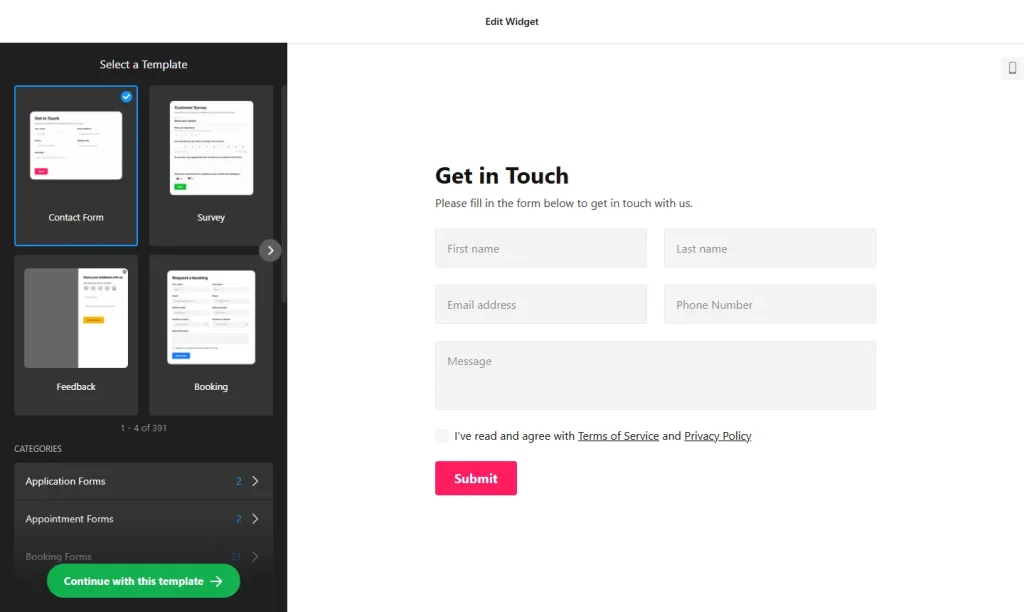
Use the online form builder below to create a free form for your Google Sites page. Choose a template and click “Continue with this template” to adjust it.
Schools, clubs, nonprofits and teams use Google Sites because it’s quick to set up and easy to share. Forms fit naturally there: event and trip registrations, volunteer sign-ups, membership applications, IT or equipment requests on an internal site. This form builder gives you templates for those, a multistep layout for longer forms and a Google Sheets connection for the entries. You add the form with the Embed tool, and it sits in its own box on the page.
How to add a Form Builder widget to Google Sites
1. Create your widget
- Start with a template: Event registration, Registration, Application and Appointment forms all suit clubs, schools and nonprofits. Or describe the form and let the AI generator create it.
- Add the fields you need from more than 20 types, such as date selectors for events, image choice for options and file upload for documents.
- Use the Inline embed type with a Vertical or Multistep layout. Multistep keeps a long registration form compact, which helps inside a fixed-size embed box.
- Send entries where your team works: connect Google Sheets, and add CC or BCC to the notification email so a co-organizer gets a copy.
- Save it: click “Add to website for free“, sign up on the next page and copy your embed code.
2. Add it to your Google Site
- Open your site in Google Sites and go to the page for the form, for example Events or Volunteer.
- In the Insert panel on the right, click Embed and choose the Embed code tab.
- Paste the form code, then click Next and Insert.
- Drag the edges of the embed box until the whole form fits. For a Multistep form, check each step and size the box for the tallest one.
- Publish the site and submit a test entry to check that it reaches your email and your Google Sheet.
Where to put the Form Builder widget on your Google Site
- On an Events page, with a registration form for a match, trip, fundraiser or open day.
- On a Volunteer or Get Involved page for a nonprofit, with date selectors for availability.
- On a Join Us page for a club or society, with a membership application.
- On an internal team site, as an IT, equipment or room request form.
Do you need a paid Google Sites plan?
No. Embedding code is a built-in Google Sites tool, so the form goes in like any other embed. What Google Sites does do is box every embed in its own isolated frame. The form only shows inside that box, and you can’t add code to every page at once.
That rules out the Floating pane embed type: a floating form would stay trapped in its box. Use Inline, and add the form to each page that needs it. If a script widget won’t load, try the widget’s iframe version where one exists. The widget’s free plan covers one widget with up to 200 views a month on unlimited websites, with a small Elfsight link; paid plans start at $5 a month, billed yearly.
Form Builder widget features
- Google Sheets integration for a shared list of registrations or requests.
- Event registration, registration and application templates, plus AI form generation.
- Multistep layout to keep longer forms compact.
- File upload with the file types you allow, for documents or photos.
- Email notifications with CC and BCC, and an automatic reply to everyone who signs up.
- Google reCAPTCHA spam protection, with Google’s legal notice added to the form footer.
Frequently asked questions
Can I embed this form builder widget in Google Sites?
Yes. Use Insert › Embed › Embed code, paste the code and resize the box so the whole form fits.
Why is my form cut off in Google Sites?
The embed box is smaller than the form. Drag its edges in the editor until every field and the submit button show, checking each step of a multistep form, then publish again.
Can I show the form as a floating pane on Google Sites?
No. Google Sites keeps each embed inside its own box, so a floating pane can’t float over the page. Choose the Inline embed type instead.
Can registrations go straight to a Google Sheet?
Yes. Connect Google Sheets in the builder’s integrations, and each new entry is added to your sheet as well as emailed to you.
Is it free for a school or club site?
Yes. The free plan includes one widget with up to 200 views a month on unlimited websites, with a small Elfsight branding link. Paid plans start at $5 a month, billed yearly.
More Google Sites widgets
- Form Builder widget
All templates and features - Google Sites FAQ widget
Questions and answers in an accordion - Google Sites Google Reviews widget
Your Google Business reviews and rating - Google Sites Contact Form widget
A simple contact form - Google Sites Instagram Feed widget
Your latest Instagram posts and reels - Essential Google Sites widgets
10+ widgets that work well on Google Sites