
A church website has two audiences. Members want this week’s details: service times, what’s coming up, last Sunday’s sermon. Newcomers want to know whether they’d feel at home before they walk in: what you believe, where you are, when to come, and what to expect. Both groups look for the same few things, and both give up when they can’t find them.
The newcomer group is bigger than it looks. In a 2023 Lifeway Research survey of US Protestant churchgoers who have changed churches, 37% said they used church websites while looking for a new church. Those who first found their current church through its website named the same practical details again and again:
What newcomers found most helpful on a church's website
US Protestant churchgoers who changed churches and first found their current church through its website
Percentages add up to more than 100% because people named several things. Survey of 1,001 US Protestant churchgoers who attend at least twice a month and have attended more than one church as an adult, July–August 2023.
Source: Lifeway Research, Church Switchers study (November 2023)
Show data table
| Item | Value |
|---|---|
| Beliefs and mission | 67% |
| Church location | 66% |
| Worship times | 64% |
| Ministries or events | 50% |
| Sermons | 42% |
| Contact information | 39% |
| Staff profiles | 33% |
| Social media contacts | 26% |
Most of that list is easy to cover with small widgets pasted into the site you already have, on Wix, Squarespace, WordPress, Google Sites, Shopify or Webflow. Beliefs and mission are the exception: no widget writes those for you, so give them a clear page of their own and link it from the homepage. The nine widgets below handle almost everything else, and you can build each one for free.
In this guide
- The 9 widgets at a glance
- 1. Service times that are always right
- 2. A map with directions and parking
- 3. Sermon videos and livestream recordings
- 4. Sermon audio for listening on the go
- 5. An event calendar for ministries and gatherings
- 6. Online giving
- 7. Staff and leaders
- 8. A “Plan your visit” FAQ
- 9. A prayer request and contact form
- Bonus: 6 more widgets worth adding
- Where to put each widget
- How to add these widgets to your website
- Frequently asked questions
- Start with your service times
The 9 widgets at a glance
| # | Widget | The question it answers | Free builder |
|---|---|---|---|
| 1 | Service times | “When should I come?” | Business hours |
| 2 | Map and directions | “Where are you, and where do I park?” | Google Maps |
| 3 | Sermon videos | “What’s the preaching like?” | YouTube gallery |
| 4 | Sermon audio | “Can I listen on my way to work?” | Podcast player |
| 5 | Event calendar | “What’s happening this week?” | Event calendar |
| 6 | Online giving | “How can I give?” | PayPal button |
| 7 | Staff and leaders | “Who will I meet?” | Team showcase |
| 8 | “Plan your visit” FAQ | “What should I expect on Sunday?” | FAQ widget |
| 9 | Prayer request and contact form | “Can someone get back to me?” | Form builder |
1. Service times that are always right
Worship times were one of the three things newcomers found most helpful in the Lifeway survey (64%). Yet on many church sites they sit in a footer, an old bulletin PDF, or a photo of the sign out front. Put them near the top of the homepage, as text, and keep them current. Nothing loses a first-time visitor faster than arriving for a service that moved to a different time.
A business hours widget works well as a service-times box. It supports more than one time slot per day, so an early and a late service fit on the same line. Its Special days setting handles Christmas Eve, Easter or a summer schedule, so you don’t have to edit the regular times and change them back later. Templates such as Hours & Contacts add your address and phone next to the schedule, and you can add buttons like Call, Directions or Message right below the times.
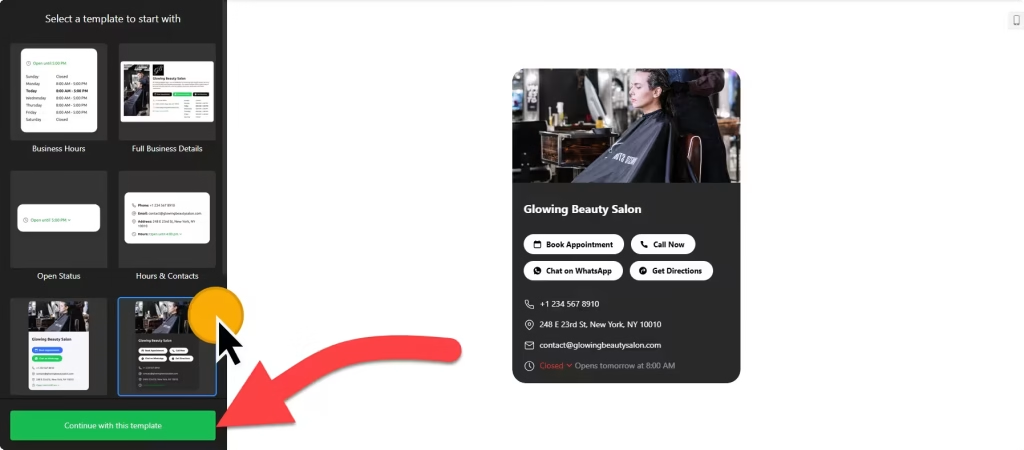
Tip: describe each service in a few words, such as “Traditional, with choir” or “Contemporary, with band and kids’ program”. It helps visitors pick the one that suits them.
2. A map with directions and parking
Location was the second most helpful thing on church websites for newcomers (66%). An address in the footer doesn’t answer “where do I park?” or “which door do I use?”. A Google Maps widget shows an interactive map, and each location can carry a description, photo, address, phone number and opening hours that appear when someone clicks the marker.
If your church meets in more than one place, such as a second campus or a separate youth building, the Multiple Locations template lists them in a side panel with a search bar. Tip: add one line of text next to the map about parking, the accessible entrance, and where families check children in.
3. Sermon videos and livestream recordings
For many people, a sermon video is the first visit. Pew Research Center’s 2023–24 Religious Landscape Study found that almost a quarter of US adults watch religious services online or on TV at least once a month:
How US adults take part in religious services at least once a month
Source: Pew Research Center, 2023-24 Religious Landscape Study (February 2025)
Lifeway’s survey points the same way: a small group of church switchers first attended their current church through a streamed service, and just over half of them watched four or more times before visiting in person. Your recordings are doing the welcoming before anyone shakes a hand.
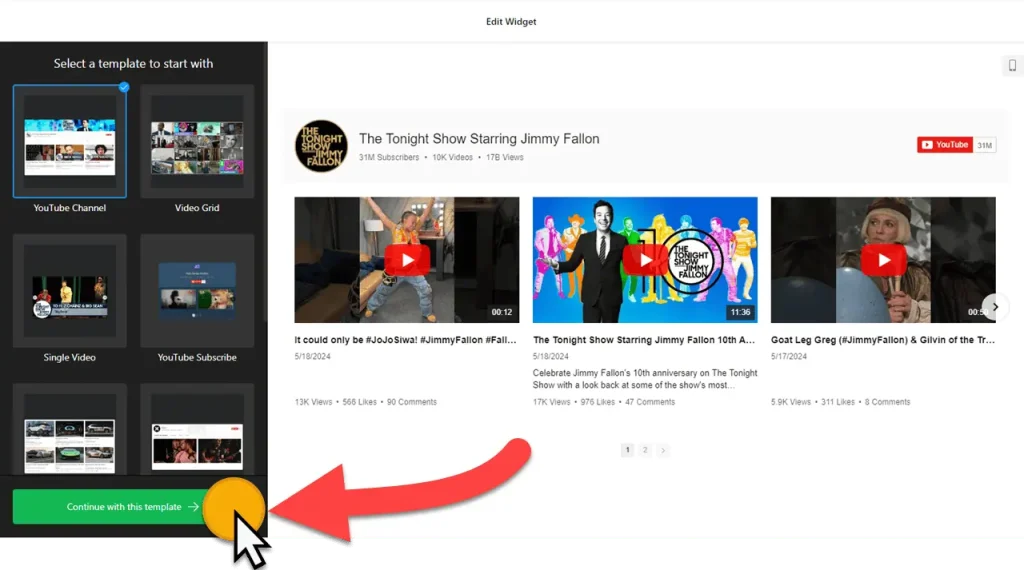
A YouTube gallery widget shows your channel, playlists or selected videos on your sermons page, so they play on your site instead of sending people off to YouTube. You can create source groups, for example one per sermon series, and adjust the header, columns, rows and popup player. Because the gallery pulls from your channel or playlist, new uploads show up without editing the website. If you also post clips on Vimeo, Instagram Reels or TikTok, a video gallery widget combines them in one place, and a Vimeo gallery suits churches that host recordings on Vimeo.
4. Sermon audio for listening on the go
Not everyone wants to watch. Plenty of people listen to sermons on a commute, a walk, or in the kitchen. If you already publish sermon audio as a podcast, a podcast player widget connects to your podcast’s feed link and plays episodes right on your site. You can add links to the apps people already use, such as Apple Podcasts and Spotify, show or hide the playlist, and choose between a player embedded on the sermons page and a floating one.
Tip: leave autoplay off. Audio that starts on its own sends people away. And give the video and the audio of each sermon the same title, so people can find it in both places.
5. An event calendar for ministries and gatherings
Ministries and events were helpful to half of the newcomers in the Lifeway survey (50%), and members check them every week: small groups, youth nights, choir practice, volunteer days, holiday services. An event calendar widget keeps them in one list that’s always current.
It can sync with Google Calendar, so events your staff already add there appear on the website on their own. Add event types (worship, youth, kids, outreach), hosts and venues so people can find what’s relevant to them, and pick a layout: list, grid, masonry, slider, month, week or day. Each event can have a description, an image and a button, for example to sign up.
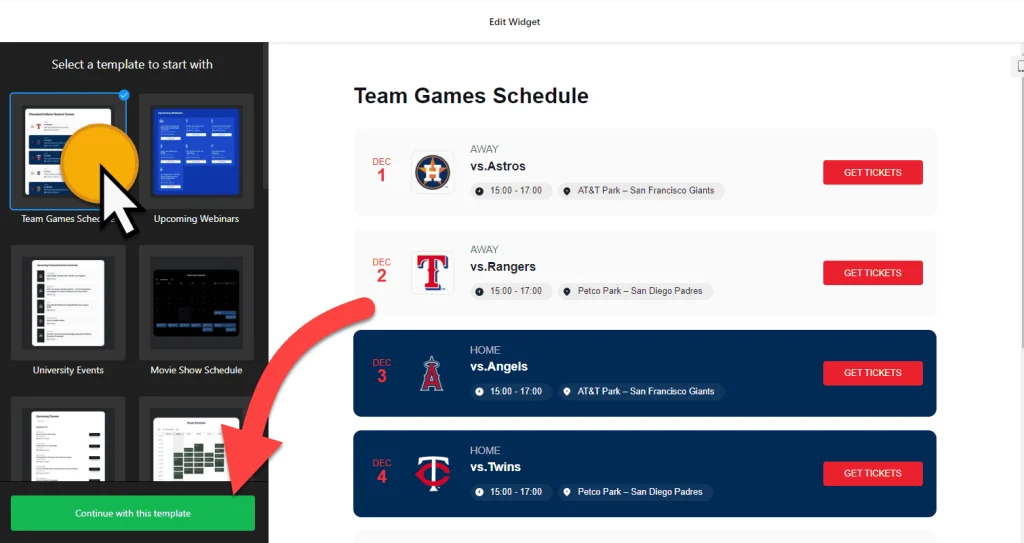
Tip: give every event a short “who it’s for” line, such as “Open to everyone” or “Parents of middle schoolers”. Newcomers often wonder whether they’re allowed to come.
6. Online giving
Giving is part of worship for many congregations, and more people now carry a phone than a checkbook. A PayPal button set to the donation type lets people give from your website, either a fixed amount or an amount they choose themselves (the Optional donation type). You can pick the currency and language, show card icons under the button, and send givers to a thank-you page afterwards.
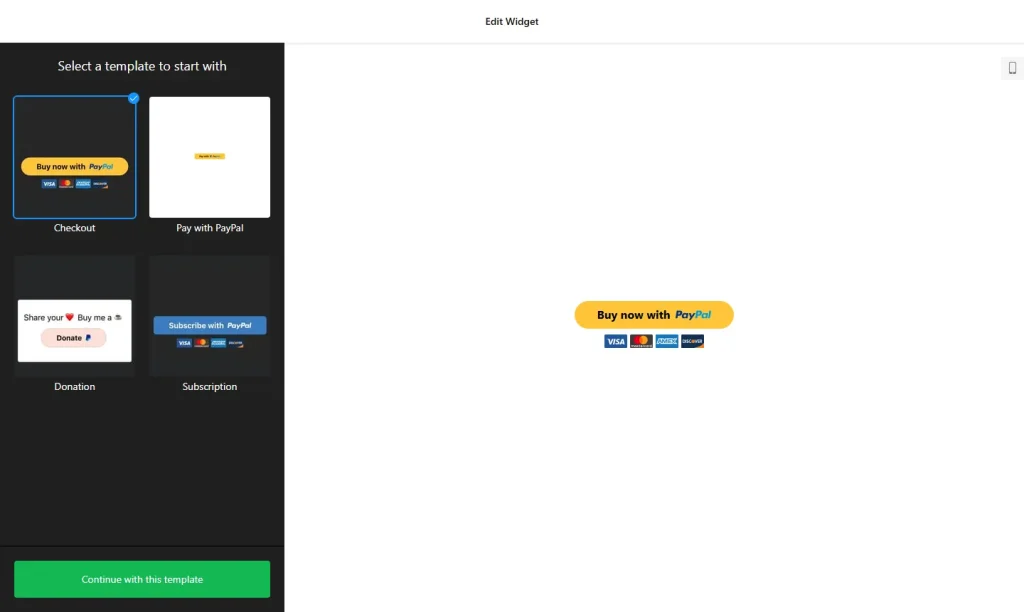
PayPal processes every gift, so PayPal’s own terms and fees apply. Rules for giving receipts and tax deductions depend on where you are, so check local rules before you promise a receipt. If your church already uses a dedicated giving platform, it most likely gives you its own button or embed code: paste it in the same way. Tip: put a “Give” link in the main menu, not only at the bottom of one page.
7. Staff and leaders
Staff profiles helped a third of the newcomers in the survey (33%). Names and faces make a church feel approachable before the first visit, and they show people who to ask about children’s ministry, youth, music or pastoral care.
A team showcase widget gives each person a photo, name, role, short bio and contact details, with a popup for the full profile so the page stays tidy. Group people by ministry (pastoral team, children, youth, worship, office) and choose a grid, list, gallery or card layout. Tip: ask permission before publishing anyone’s photo, and use shared ministry email addresses rather than personal ones where you can.
8. A “Plan your visit” FAQ
First-time visitors tend to have the same handful of questions: What should I wear? How long is the service? Is there something for my kids? Where do I park? Will I be singled out as a guest? Answering them before Sunday removes most of the nerves.
An FAQ widget shows those answers in a neat accordion, list or multi-column layout. You can sort longer FAQs into categories with icons and add links inside answers, so “Where do I park?” can point to the map and “Is there something for my kids?” to the children’s ministry page. Put it on a “Plan your visit” or “New here?” page, link that page from the homepage, and keep each answer to two or three sentences.
9. A prayer request and contact form
Some visitors want to reach a person before they ever walk in, and members want an easy way to share a prayer request or ask for a pastoral visit. Contact information was helpful to 39% of the newcomers in the survey. A form builder widget covers both: start from one of hundreds of templates, add only the fields you need, and get an email every time someone fills it in. It has Google reCAPTCHA spam protection and can send entries to Google Sheets, or to other tools through Zapier.
Prayer requests can be very personal. Ask only for what you need (often just a first name, the request, and whether it may be shared with the prayer team), say who will read it, and keep the responses private.
Bonus: 6 more widgets worth adding
- Newsletter sign-up: collect emails for a weekly update with news, events and the latest sermon. It can send sign-ups to Mailchimp or Google Sheets.
- Photo gallery: baptisms, picnics, mission trips and holiday services. Ask before posting photos of children.
- Facebook feed: if your weekly news already lives on your Facebook Page, show it on the website too.
- Announcement bar: one line at the top of every page for holiday service times, weather closures or a special event.
- Timeline: tell your church’s story from its founding to today on the About page.
- Website translator and accessibility widget: help multilingual families read your site, and let visitors enlarge text or raise contrast. An accessibility widget is a helpful extra, not a replacement for accessible content.
Where to put each widget
Lay out the homepage in the order a first-time visitor thinks: when and where, what it’s like, who’s there, and how to take the next step. Members get the same answers faster. A simple layout looks like this:
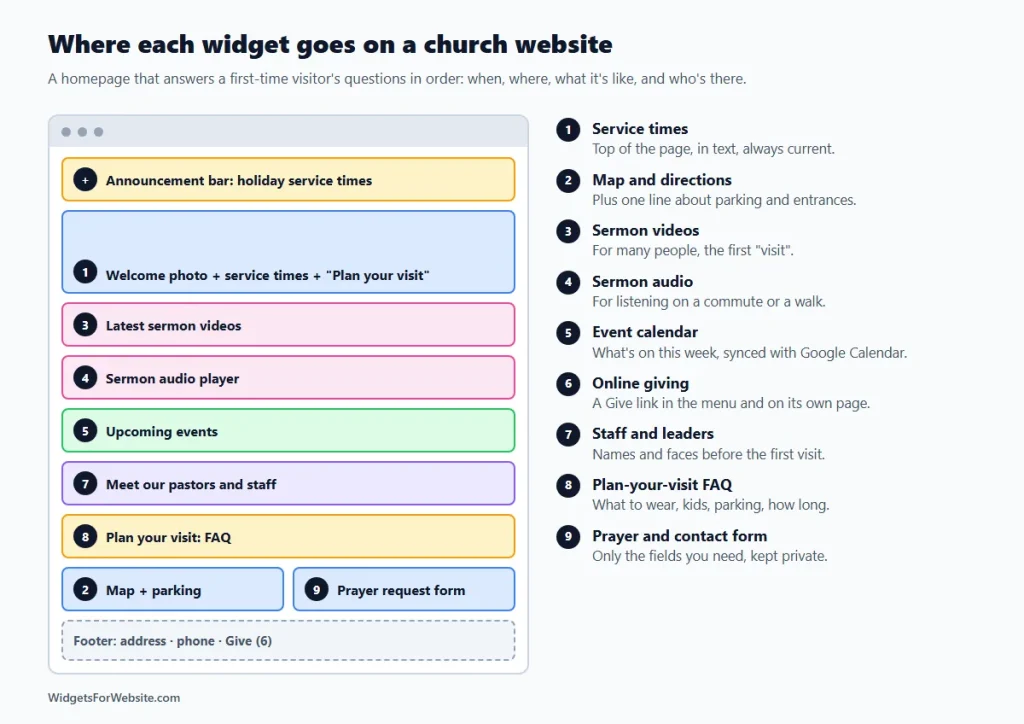
- Top of every page: an announcement bar for holiday service times or closures.
- Hero: a welcoming photo, your service times and a “Plan your visit” button.
- Latest sermon videos, with the audio player close by.
- Upcoming events, so members see what’s on this week.
- Meet the team, or a short preview that links to the staff page.
- Plan-your-visit FAQ, or a link to the page where it lives.
- Map and prayer request form near the bottom, with the address.
- Give in the main menu and the footer, leading to the giving page.
How to add these widgets to your website
Every widget above works the same way: open the builder, pick a template, customize it, and copy the embed code. Then paste the code into your website builder’s HTML or embed element. Our guide on how to add embed code to any website builder shows exactly where that element is on each platform. For platform roundups, see the best Wix widgets, best Squarespace widgets and essential Google Sites widgets.
On Google Sites, every embed runs inside its own box, so floating widgets such as an announcement bar or a floating audio player only show inside that box. Use their inline versions there.
Free to start. Elfsight’s free plan includes one widget with up to 200 views a month and a small Elfsight branding link. Paid plans start at $5 a month (billed yearly) and add more views and remove the branding. If your homepage gets more than a few hundred visits a month, plan for a paid plan on the widgets you put there.
Keep it fast. Many visitors open your site on a phone on Sunday morning. Start with service times and the map, check how the page loads on your own phone, and add extras one at a time. Our guide do website widgets slow down your site? shows how to keep pages quick.
Frequently asked questions
Which widgets should a church website add first?
Start with service times and a map with directions, because newcomers look for those first. Then add a “Plan your visit” FAQ, sermon videos and an event calendar. Online giving, staff profiles and a prayer request form can follow.
Should we stream services on our website or on YouTube?
Stream on YouTube or the platform you already use, then show the recordings on your website with a video gallery widget. Visitors can watch on your sermons page, and new uploads appear there without extra work.
Is it safe to accept donations through a button on our website?
With a PayPal button, givers complete the payment on PayPal’s checkout, so card details are entered with PayPal rather than on your site. PayPal’s terms and fees apply, and rules for giving receipts depend on where you are, so check local rules.
How do we keep service times and events up to date?
Edit the widget in its builder and save. The embed code on your site stays the same, so every page that shows the widget updates. Use Special days in the business hours widget for holiday services, and connect the event calendar to Google Calendar so new events appear on their own.
Can we add these widgets to Wix, Squarespace or Google Sites?
Yes. Each widget gives you an embed code that works on Wix, Squarespace, WordPress, Google Sites, Shopify and Webflow. On Google Sites, floating widgets only show inside their embed box, so use their inline versions there.
Start with your service times
If you do one thing this week, put your service times and address at the top of the homepage with a free business hours widget and a map. It takes about fifteen minutes, and it answers the question every newcomer asks first. Then add sermons and events, or browse the full library of free widgets. This guide is part of our industry series; see also 8 website widgets every restaurant needs.
Build your first widget for free
Pick a template, customize it in your browser and paste the code into your website. The free plan covers one widget with up to 200 views a month.
Browse all 85 widgets