
Short answer: yes, every widget adds some weight to a page, but a few well-placed widgets rarely make a noticeable difference. Sites get slow when they stack many heavy embeds on one page, put them at the very top, or let them push content around as they load.
This guide explains what a widget actually costs, how that shows up in Google’s Core Web Vitals, how many widgets is too many, and seven practical ways to add reviews, feeds, maps and chat without hurting your page speed.
In this guide
- What a widget adds to your page
- How widgets affect Core Web Vitals
- How many widgets is too many?
- 7 ways to add widgets without slowing your site
- Script widget, iframe or plugin: which is lightest?
- How to test a widget’s impact
- Quick checklist
- Frequently asked questions
- Fast and useful can go together
What a widget adds to your page
When you paste an embed code, the visitor’s browser has to do extra work:
- Download files: the widget’s JavaScript, styles, fonts and images, usually from another server.
- Fetch data: your latest reviews, Instagram posts or calendar events.
- Run code: build the widget and draw it on the page. While the browser is busy doing this, it reacts more slowly to taps and clicks.
- Make room: if no space was reserved, the widget pushes the content below it down when it appears.
Most modern embed codes load their script with async, so the rest of your page doesn’t wait for the widget. That keeps the cost low, but not zero, which is why placement and quantity matter.
How widgets affect Core Web Vitals
Google measures page experience with three Core Web Vitals, based on real visits to your site. A page passes when 75% of visits meet each “good” threshold:
| Metric | What it measures | Good | How a widget can hurt it |
|---|---|---|---|
| LCP (Largest Contentful Paint) | How fast the main content appears | 2.5 s or less | A heavy widget at the top of the page competes with your hero image and text for bandwidth. |
| INP (Interaction to Next Paint) | How quickly the page reacts to taps and clicks | 200 ms or less | Widget scripts running in the background delay the response to a tap. |
| CLS (Cumulative Layout Shift) | How much content jumps around while loading | 0.1 or less | A widget that appears without reserved space pushes everything below it down. |
The good news: each of these problems has a simple fix, and most of them come down to where and how you place the widget, not whether you use it.
How many widgets is too many?
There’s no magic number, because a small rating badge and a video gallery are very different in weight. As a practical rule for small business sites:
- 1 to 3 content widgets per page (reviews, a feed, a map) is comfortable when they’re below the first screen and lazy-loaded.
- One floating widget per site: a chat bubble, a popup or a cookie banner. Each one loads on every page, so they add up fast.
- Heavy widgets deserve their own page. A large photo gallery, several video players or multiple social feeds are better on a dedicated Gallery or Community page than all on the homepage.
The real test is your own page: measure it before and after adding a widget (see “How to test” below). If the scores barely move, you’re fine.
7 ways to add widgets without slowing your site
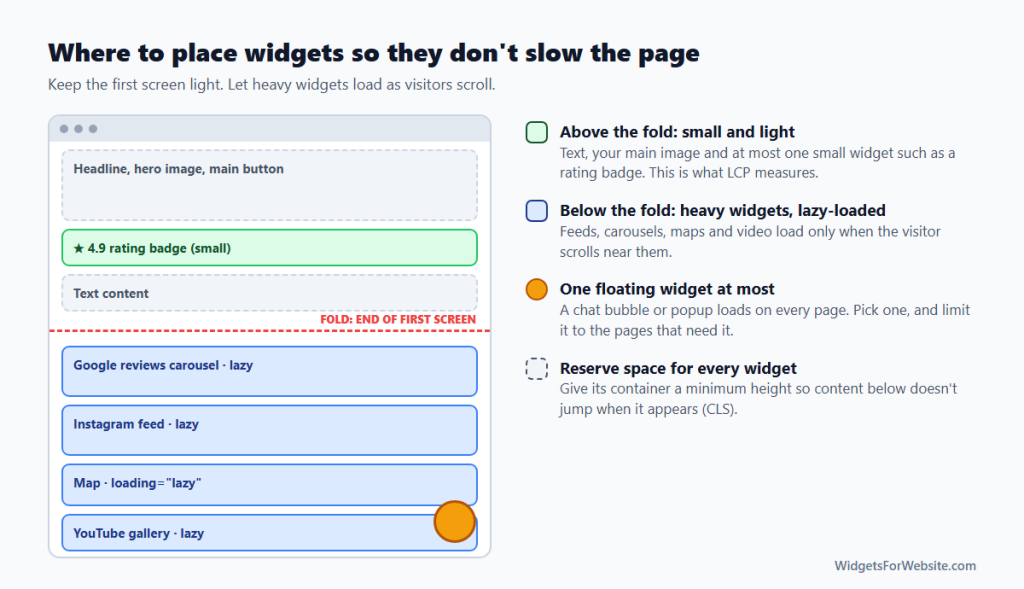
1. Keep the first screen light
Whatever visitors see before they scroll decides your LCP. Keep it to your headline, main image and button, plus at most one small widget, such as a Google rating badge. Move review carousels, Instagram feeds, maps and videos further down the page.
2. Lazy-load everything below the fold
Lazy loading means a widget only loads when the visitor scrolls near it. Someone who never reaches the bottom of the page never downloads your footer map at all.
- Script widgets: look for a lazy-load option in the widget settings or an attribute with “lazy” in its name on the placeholder
<div>of the embed code. If it’s there, keep it. Our own tool pages load their widgets this way. - Iframe embeds: add
loading="lazy"to the iframe tag. All modern browsers support it. Google Maps embed codes already include it.
<iframe src="https://example.com/widget" width="100%" height="450"
  loading="lazy" title="Customer reviews"></iframe>
Don’t lazy-load a widget that sits in the first screen; it should load right away.
3. Reserve space so the page doesn’t jump
Layout shift is the most common widget problem and the easiest to fix. Wrap the embed code in a container with a minimum height close to the widget’s real height:
<div style="min-height: 420px">
  <!-- paste your widget's embed code here -->
</div>
To find the right number, publish the page, right-click the widget, choose Inspect, and read its height. Check on mobile too: a carousel is often taller on a phone. For iframes, always set a height.
4. Load the platform script once
Many widget providers use one shared script plus a small placeholder per widget. If you add several widgets from the same provider to one page, you usually only need the <script> line once. The browser caches it either way, but removing duplicates keeps your page code tidy and avoids loading it twice on builders that wrap each embed separately.
5. Show floating widgets only where they help
Chat bubbles, popups and announcement bars usually go into site-wide code, so they load on every page, including blog posts where nobody needs them. Use the widget’s display conditions to limit them to the pages that matter, for example a WhatsApp chat button only on your services, pricing and contact pages. Not sure which chat to use? See WhatsApp vs Messenger vs live chat.
6. Use lighter versions of heavy widgets
- Limit the items. A reviews widget showing 6 reviews loads less than one showing 50. Set the maximum count in the widget settings.
- Choose a smaller layout. A rating badge instead of a full carousel; a grid of 6 posts instead of an endless feed.
- Video: show thumbnails first. A grid of video thumbnails that opens each video in a popup when clicked, such as a YouTube gallery widget, is lighter than several full video players embedded on the page. Avoid autoplay.
- One feed, not three. A single social feed that combines several networks is lighter than separate Instagram, Facebook and TikTok embeds.
7. Check your speed plugin’s settings (WordPress)
Performance plugins such as WP Rocket, LiteSpeed Cache or Perfmatters can delay JavaScript until the visitor first scrolls, taps or moves the mouse. That’s great for below-the-fold widgets and floating chat buttons, but a widget in the first screen may then appear late or look empty until the visitor interacts. If that happens, exclude that widget’s script from the delay setting. After any change, clear the cache and test again.
Script widget, iframe or plugin: which is lightest?
- Script embeds run inside your page. They can size themselves to fit and lazy-load, but their code shares the page’s resources.
- Iframe embeds load a separate mini-page. They’re isolated from your site, and
loading="lazy"works natively, but each one carries its own page overhead. Some builders, such as Wix and Google Sites, put every embed in an iframe anyway. - WordPress plugins aren’t automatically lighter. Many load their files on every page of your site, even pages without the feature. An embed loads only where you paste it.
Which kind of code your builder accepts, and where to paste it, is covered in how to add embed code to any website builder.
How to test a widget’s impact
- Measure before. Run the page through PageSpeed Insights on the Mobile tab. Note the performance score and the LCP, CLS and Total Blocking Time values in the lab results.
- Add the widget, publish, and clear any cache.
- Measure after, three times, and compare the middle result. Lab scores vary a few points between runs, so ignore small differences.
- Watch the real-world data. The “Discover what your real users are experiencing” section of PageSpeed Insights and the Core Web Vitals report in Google Search Console show field data from real visitors. They update over about four weeks, so check back later.
If CLS jumps, reserve space (tip 3). If LCP gets worse, move the widget lower (tip 1). If Total Blocking Time rises, reduce the number of widgets or delay their scripts (tips 6 and 7).
Quick checklist
- First screen: headline, image, button and at most one small widget.
- Everything below the fold is lazy-loaded.
- Every widget has reserved space (min-height or iframe height).
- One floating widget, shown only on pages that need it.
- Item counts limited; no autoplay video.
- Tested on mobile in PageSpeed Insights before and after.
Frequently asked questions
Will widgets hurt my Google rankings?
Not by themselves. Google’s ranking systems reward good page experience, including Core Web Vitals, but relevant, helpful content matters far more. A few widgets placed as described above won’t push a page out of the “good” range. A page overloaded with slow embeds can, and it frustrates visitors either way.
Does async mean a widget has no effect on speed?
No. async means the page doesn’t wait for the script to download, so your content appears sooner. The script still downloads, runs and draws the widget, which uses bandwidth and processing time, especially on slower phones.
Do chat widgets slow down a website?
One chat widget has a small effect, and most load after the main content. The bigger risk is stacking several floating tools: a chat bubble, a popup, a cookie banner and a review badge all loading on every page. Combine channels in one all-in-one chat widget and limit it to the pages that need it.
Is an iframe faster than a script embed?
Not necessarily. An iframe keeps the widget isolated and is easy to lazy-load with loading="lazy", but it loads a whole separate page. A script embed with lazy loading and reserved space is usually just as light. Use whichever your website builder supports best.
My widget loads late or only after I scroll. Is that a problem?
For widgets below the fold, that’s lazy loading working as intended. For a widget in the first screen, it usually means a speed plugin is delaying its script. Exclude that script from “delay JavaScript” or move the widget further down the page.
Fast and useful can go together
Widgets earn their place when they answer a visitor’s question: reviews that build trust, a map that shows the way, a chat button that answers fast. Add the ones your visitors need, place them thoughtfully, and test once. For ideas on which widgets to start with, browse the 90+ free HTML widgets or see 8 website widgets every restaurant needs.
Build your first widget for free
Pick a template, customize it in your browser and paste the code into your website. The free plan covers one widget with up to 200 views a month.
Browse all 85 widgets