
You know reviews help people decide, and you’ve decided to show them on your website. Next question: which ones? Most businesses collect reviews in two or three places, usually Google, Facebook and sometimes Trustpilot, and each platform works differently: who can post, how ratings are calculated, what you’re allowed to do, and how easy it is to put them on your site.
This guide compares the three side by side, then shows which to lead with for your type of business and how to display them.
In this guide
- The short answer
- Side-by-side comparison
- Google reviews
- Facebook recommendations
- Trustpilot
- Which reviews to show for your type of business
- Show reviews from several platforms at once
- Rules that apply on every platform
- How to get more reviews on each platform
- Frequently asked questions
- Put your best reviews to work
The short answer
- Local business (restaurant, salon, clinic, trades): lead with Google reviews. They’re what people see in Search and Maps, and they help your local ranking.
- Online store or online service: Trustpilot is built for you, and it can feed seller ratings in Google Ads.
- Community, events or a Facebook-first audience: Facebook recommendations are worth showing, ideally alongside Google.
Side-by-side comparison
| Google reviews | Facebook recommendations | Trustpilot | |
|---|---|---|---|
| Who can post | Anyone signed in to a Google account | Anyone logged in to Facebook | Anyone 18+ with a recent, genuine experience |
| Rating format | Stars, with optional text and photos | Yes / No “Do you recommend?” plus text | Stars and text; overall TrustScore |
| How the overall score works | Average star rating | Recommendation score shown once a Page has 5+ public reviews | Weighted: newer reviews count more, plus 7 “extra” reviews at 3.5 stars |
| Can the business remove reviews? | No, only report policy violations | Can turn the whole section off | No, only report guideline breaches |
| Where people see them | Google Search and Maps | Your Facebook Page | Trustpilot, and Google Ads seller ratings |
| Best for | Local businesses and services | Facebook-first audiences | Online stores and services |
| Show on your site with | Google reviews widget | All-in-one reviews widget | Trustpilot’s own TrustBox widgets |
Google reviews
Google reviews live on your Google Business Profile and show up wherever people find you on Google: the local results, the map, and your business panel. To leave one, a customer must be signed in to a Google account, so there are no anonymous reviews. You can reply to every review, but you can’t delete one; you can only report reviews that break Google’s policies.
Why they matter most for local businesses: Google says the number of reviews and your ratings are part of what decides how prominent you are in local results. More reviews and positive ratings can help your local ranking, so every review you collect works twice: on Google and on your site.
How to show them: a Google reviews widget pulls them from your Business Profile into a carousel, grid or list that updates automatically, and a Google rating badge shows your star rating in a single line. Platform guides: Wix, Squarespace, Shopify, WordPress and Google Sites.
Facebook recommendations
Facebook no longer asks for star ratings. Visitors answer “Do you recommend this Page?” with Yes or No and can add a written comment. Once a Page has at least five public recommendations, Facebook shows an overall recommendation score.
Good to know: unlike Google, a Page owner can switch reviews off entirely in the Page settings. That’s convenient for the business but it’s also why some visitors trust Facebook recommendations a little less. If your reviews widget suddenly shows nothing, check that the setting “Allow others to view and leave reviews on your Page” is still on.
How to show them: the all-in-one reviews widget supports Facebook as a source, alone or combined with Google and other platforms. If Facebook is your only source, there’s also a dedicated Facebook Reviews widget. Recommendations work best as a second source next to Google, because “92 people recommend us” is strong, while yes/no answers don’t carry star ratings.
Trustpilot
Trustpilot is an open review platform: anyone 18 or older with a recent, genuine experience can review any company, whether or not the company has signed up. Businesses can invite customers to review them. Reviews from automatic invitations are labeled Verified, reviews from manual invitations are labeled Invited, and reviews people write on their own have no label.
Your TrustScore isn’t a simple average. It gives more weight to recent reviews and adds seven “extra” reviews at 3.5 stars to every company, so a business with only a handful of perfect reviews can’t jump straight to the top. The score reflects how you’re doing now, not five years ago.
Why online businesses like it: Trustpilot is a supported source for Google Ads seller ratings, the stars that can appear under your ads. Google looks at reviews from the last 24 months; most merchants get a rating after collecting 100 or more eligible reviews, and text ads need a rating of at least 3.5 stars.
How to show them: Trustpilot provides its own widgets, called TrustBoxes. The free plan includes a basic Review Collector widget for gathering reviews; the widgets that display your reviews and TrustScore need a paid plan. Our all-in-one reviews widget doesn’t currently list Trustpilot as a source, so if your reviews are mainly on Trustpilot, use their widgets. On a free plan, a link to your Trustpilot profile from your homepage or footer is a simple start.
Which reviews to show for your type of business
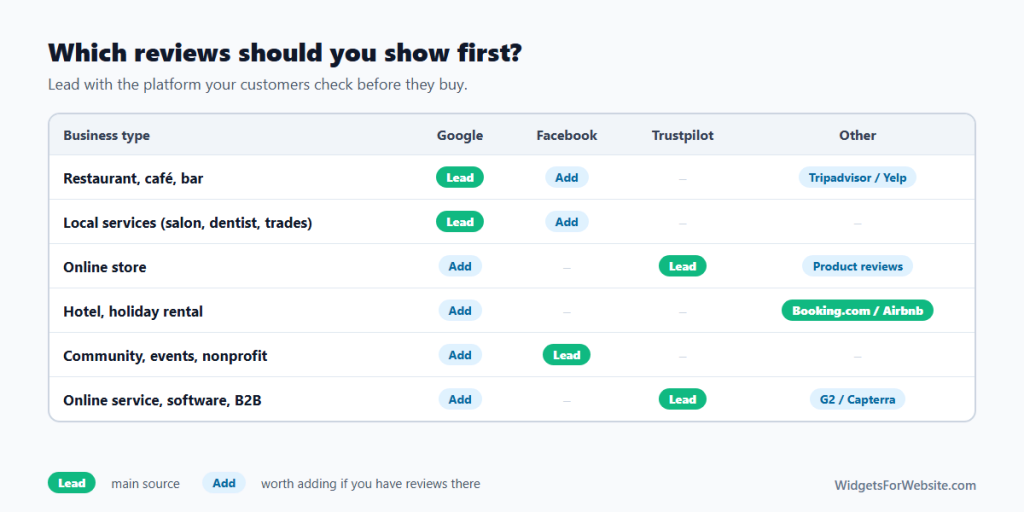
Lead with the platform your customers check before they buy, then add others if you have a good number of reviews there.
- Restaurants, cafés and bars: Google first; add Tripadvisor or Yelp if diners use them in your area. See 8 website widgets every restaurant needs.
- Local services such as salons, dentists, plumbers and lawyers: Google first, Facebook as a second source.
- Online stores: Trustpilot for the store, plus product reviews. If you sell on marketplaces, show those too with the Amazon, Etsy or eBay reviews widgets.
- Hotels and holiday rentals: the booking platforms your guests use, with the Booking.com and Airbnb reviews widgets, plus Google.
- Community groups, events and nonprofits: Facebook recommendations, plus Google if you have a physical location.
- Software and B2B services: Trustpilot or industry sites such as G2 and Capterra, which the all-in-one reviews widget supports, plus detailed client testimonials.
Show reviews from several platforms at once
If customers review you in several places, one feed is more convincing than three half-empty widgets. The all-in-one reviews widget combines sources such as Google, Facebook, Tripadvisor, Yelp, Booking.com, Airbnb, G2 and Capterra, and can group reviews by platform so visitors see where each one came from. You can also add reviews you received directly as a custom source.
For more ways to use reviews, such as rating badges next to buttons, video testimonials and client logos, see 9 ways to show reviews and testimonials on your website.
Rules that apply on every platform
- Don’t pay for reviews. Google’s policy forbids offering payment, discounts or free goods for reviews, and Trustpilot bans incentives to write or change a review.
- Ask everyone, not only happy customers. Google forbids selectively asking for positive reviews, and Trustpilot requires you to invite all customers the same way, whatever their experience. Trustpilot can put a consumer warning on the profile of a company that breaks its rules.
- Don’t hide bad reviews and pretend you didn’t. In the US, the FTC’s rule on consumer reviews (in force since October 2024) bans fake reviews and buying reviews. It also bans implying that the reviews on your site are all or most of your reviews when you’ve hidden some because they’re negative. Filtering out fake, offensive or unrelated reviews is fine if you apply the same rules to all of them.
- Reply, especially to critical reviews. A calm, helpful reply shows future customers how you handle problems, and owner replies can be displayed in the Google reviews widget.
How to get more reviews on each platform
- Google: your Business Profile gives you a review link and QR code. Put the link in your email signature and receipts, and the QR code on the counter, menu or invoice. Create a QR code widget if you want it on your website too.
- Facebook: make sure recommendations are switched on, and ask your most engaged followers after an event or a great experience.
- Trustpilot: set up automatic invitations after every order. They reach every customer equally, which keeps you within Trustpilot’s rules, and the resulting reviews are labeled Verified.
Frequently asked questions
Which review platform do customers trust most?
The one they already use to make the decision. For local businesses that’s usually Google, because reviews appear right next to your address and opening hours. For online shopping, Trustpilot and product reviews carry more weight. Showing reviews from the platform your customers know matters more than which platform is “best” in general.
Can I show Trustpilot reviews on my website for free?
Only in a limited way. Trustpilot’s free plan includes a basic Review Collector widget; the widgets that display your reviews and TrustScore require a paid plan. On the free plan, you can link to your Trustpilot profile from your website. This guide to Trustpilot’s widgets lists which TrustBoxes come with each plan.
Can I hide negative reviews in my reviews widget?
Widgets let you filter reviews, for example by keywords or reviewer names, which is useful for removing spam or abuse. Avoid hiding reviews just because they’re critical while implying that what you show is the full picture; in the US that can break the FTC’s rule on consumer reviews. A few honest critical reviews with good replies also make the rest more believable.
Do Google reviews on my website help my SEO?
The reviews themselves help your local ranking on Google, because review count and ratings feed into local prominence. Showing them on your website mainly helps conversions: visitors trust you faster. Google doesn’t show review stars in search results for reviews a business displays about itself on its own site.
Why don’t my Facebook reviews show up in the widget?
The most common reason is that reviews are switched off in your Page settings. Check that “Allow others to view and leave reviews on your Page” is turned on. Facebook also only shows an overall recommendation score once a Page has at least five public recommendations.
Put your best reviews to work
Pick the platform your customers trust, and show it where they decide. Start with a free Google reviews widget or combine several sources with the all-in-one reviews widget. Our guide on adding embed code to any website builder shows where to paste it.
Build your first widget for free
Pick a template, customize it in your browser and paste the code into your website. The free plan covers one widget with up to 200 views a month.
Browse all 85 widgets